
Website downtime can have severe consequences for businesses, affecting everything from revenue and customer trust to search engine rankings. Understanding the causes of downtime and implementing strategies to minimize it is crucial for maintaining a reliable online presence. This article explores the impact of downtime on businesses, the common causes of web hosting reliability issues, and strategies to ensure high uptime and reliability.
Read about also: Top Domain Name Trends for 2024: What You Need to Know.
The Consequences of Downtime
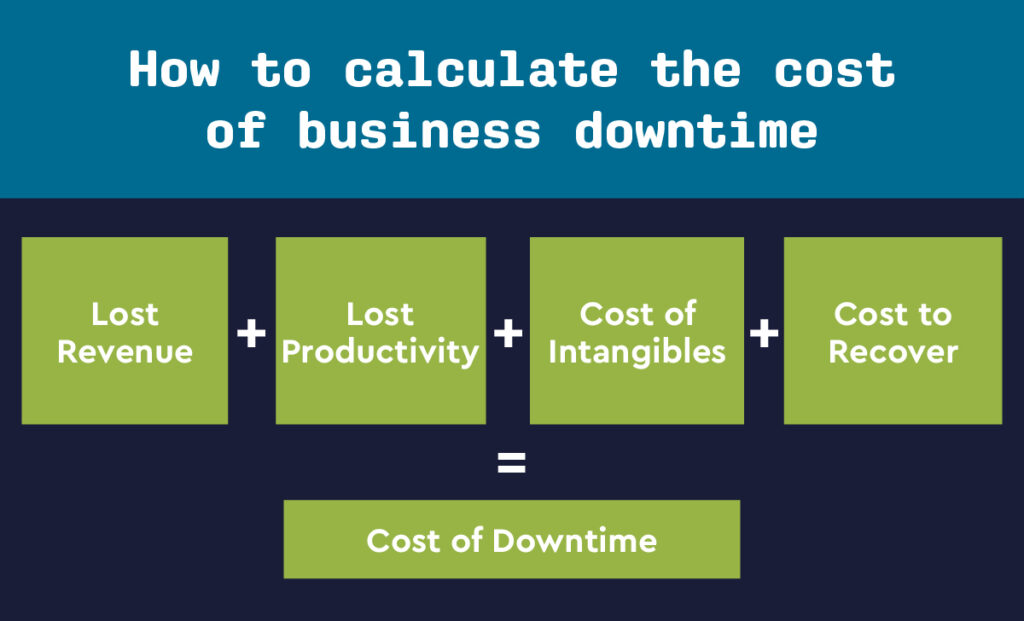
- Revenue Loss
- For e-commerce websites, downtime directly translates to lost sales. Every minute your website is down is a minute potential customers cannot make purchases. This loss can be substantial during peak shopping times or special promotions.
- Damage to Reputation
- Frequent downtime can damage your business’s reputation. Customers expect websites to be available and accessible at all times. Persistent issues can lead to frustration, loss of trust, and ultimately, a decline in customer loyalty.
- Negative Impact on SEO
- Search engines prioritize websites that offer reliable and fast user experiences. Frequent downtime can lead to lower search engine rankings, reducing organic traffic and visibility. Search engines may interpret downtime as a sign of poor website management.
- Operational Disruption
- Downtime can disrupt internal operations, especially if your business relies on web-based applications for tasks such as customer service, inventory management, and communication. This disruption can slow down business processes and reduce overall productivity.
- Customer Service Challenges
- When your website is down, customer service teams may be overwhelmed with inquiries from frustrated customers. This can lead to increased support costs and strain on your customer service resources.
Common Causes of Downtime
- Server Overload
- When servers are overwhelmed by high traffic volumes or resource-intensive applications, they can become overloaded and crash. This is particularly common during peak times or unexpected traffic spikes.
- Hardware Failures
- Physical components of servers, such as hard drives, CPUs, and power supplies, can fail, leading to downtime. Although hosting providers often have redundancy measures, hardware failures can still cause significant disruptions.
- Software Issues
- Bugs, misconfigurations, and compatibility issues in the server software, operating system, or applications can cause crashes and downtime. Regular updates and patches are necessary to address these vulnerabilities.
- Cyberattacks
- DDoS attacks, malware, and hacking attempts can disrupt website availability and lead to prolonged downtime. Cybersecurity measures are essential to protect against these threats.
- Network Problems
- Issues with the network infrastructure, such as router failures, DNS problems, or ISP outages, can cause connectivity issues and make your website inaccessible.
- Human Error
- Mistakes during website updates, server maintenance, or configuration changes can lead to accidental downtime. Proper training and procedures are vital to minimize human error.

Strategies to Minimize Downtime
- Choose a Reliable Hosting Provider
- Selecting a hosting provider with a strong reputation for reliability and high uptime guarantees is crucial. Look for providers that offer at least a 99.9% uptime guarantee and have robust infrastructure and support systems.
- Implement Redundancy and Failover Solutions
- Redundancy involves having backup systems and components that can take over in case of a failure. Failover solutions automatically switch to a standby server if the primary server goes down, minimizing downtime.
- Regular Maintenance and Updates
- Regularly updating your server software, operating system, and applications helps prevent bugs and vulnerabilities that could lead to downtime. Scheduled maintenance should be performed during off-peak hours to minimize disruption.
- Monitor Server Performance
- Use monitoring tools to track server performance and detect potential issues before they cause downtime. Monitoring can provide real-time alerts for unusual activity or resource usage spikes.
- Implement DDoS Protection
- DDoS protection services can help mitigate the impact of attacks by filtering out malicious traffic before it reaches your server. This helps maintain website availability even during an attack.
- Regular Backups
- Regularly back up your website and data to ensure that you can quickly restore operations in case of a failure. Offsite or cloud backups provide additional security against local disasters.
- Optimize Website Performance
- Optimize your website to handle traffic efficiently. This includes optimizing images, using caching, and employing content delivery networks (CDNs) to distribute traffic and reduce the load on your primary server.
- Develop a Disaster Recovery Plan
- A comprehensive disaster recovery plan outlines the steps to take in case of a major failure. This plan should include contact information for key personnel, procedures for restoring data, and communication strategies for informing customers about downtime.
Conclusion
Affecting revenue, reputation, SEO, operations, and customer service. Understanding the common causes of downtime and implementing strategies to minimize it are essential for maintaining a reliable online presence. By choosing a reliable hosting provider, implementing redundancy and failover solutions, performing regular maintenance, monitoring performance, and developing a disaster recovery plan, businesses can reduce the risk of downtime and ensure a seamless online experience for their users.