Minecraft is a game that encourages creativity, exploration, and building. But as your world expands and your creations become more complex, you might find yourself wanting to add an extra layer of protection to your bases, especially in multiplayer environments. This is where Minecraft security features like security cameras and the Security Craft mod come into play. In this article, we’ll explore how you can use security measures in Minecraft, how to install and use Minecraft security camera mods, and how the Minecraft Security Craft mod can take your in-game security to the next level.
Why You Need Security in Minecraft
As Minecraft worlds grow, so do the risks. Whether you’re playing in a multiplayer server where other players might invade your base, or you’re simply looking to keep mobs out of certain areas, security features can help protect your assets. Installing Minecraft security measures like cameras and traps can give you peace of mind, allowing you to focus on building and exploring.
Minecraft Security Cameras: Monitoring Your World
One of the most useful security tools you can add to your Minecraft world is a security camera. With the right mod, you can set up cameras around your base to monitor activities and keep an eye on any potential intruders.
How Minecraft Security Cameras Work
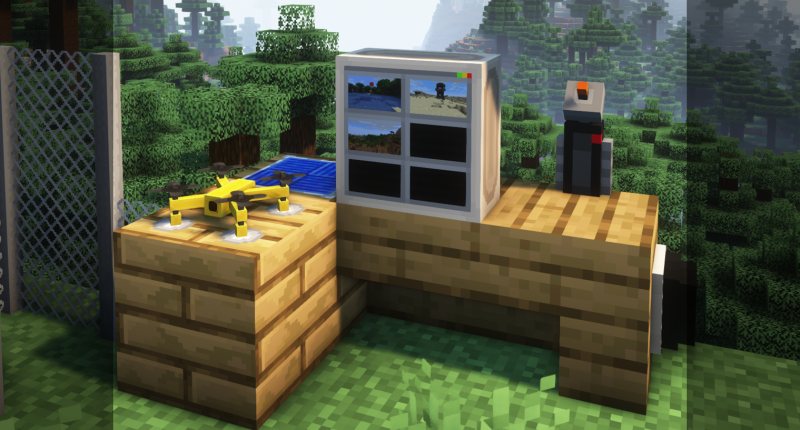
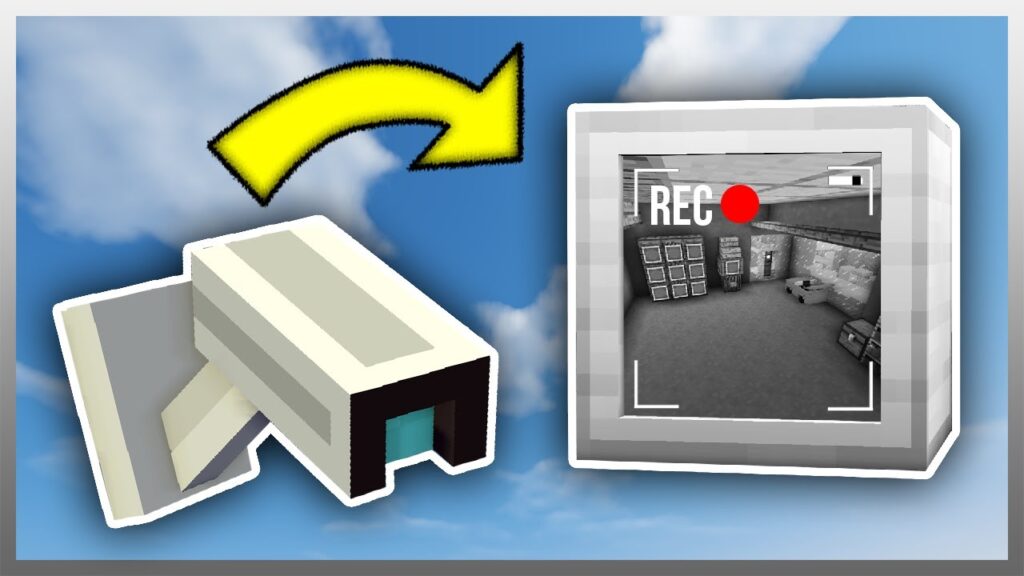
Minecraft security cameras are typically part of mods that allow you to place camera blocks in your world. These cameras can then be linked to a viewing device, enabling you to watch multiple areas from a single location.
- Placing Cameras: Cameras are usually placed like any other block. You can position them on walls, ceilings, or even hidden spots to monitor entrances, valuable storage areas, or other critical parts of your base.
- Viewing Feeds: Once placed, security cameras are linked to a monitor or control panel, which allows you to switch between camera feeds and keep an eye on different areas.
Minecraft Security Camera Mod: Adding Advanced Surveillance
If you’re looking to add security cameras to your Minecraft world, you’ll need a Minecraft security camera mod. These mods bring the functionality of real-world surveillance into the game, providing advanced features to monitor your surroundings.
Popular Security Camera Mods
- SecurityCraft: This popular mod, which we’ll discuss in detail later, includes security cameras as part of its wide array of security features. The cameras are easy to use and offer seamless integration with other security devices.
- CCTV Security Camera Mod: Specifically focused on adding CCTV (Closed-Circuit Television) cameras to Minecraft, this mod lets you set up multiple cameras and view their feeds through a central monitor.
- SpyCam Mod: Another option that provides a basic security camera system. This mod is great for players looking for a simple yet effective way to monitor their base.
How to Download and Install a Minecraft Security Camera Mod
To get started with security cameras in Minecraft, you’ll need to download and install a Minecraft security camera mod. Here’s how:
- Choose a Mod: Select the security camera mod that best suits your needs. For example, if you’re looking for a comprehensive security system, SecurityCraft is a great choice.
- Download the Mod: Visit a trusted mod hosting site, such as CurseForge, and download the mod. Make sure to download the correct version of the mod that matches your Minecraft version.
- Install the Mod: Place the downloaded mod file into your Minecraft mods folder. This folder is typically located in your
.minecraftdirectory. If you’re using a mod loader like Forge, make sure it’s installed and properly configured. - Launch Minecraft: Start the game with the mod installed. You should now be able to access the security camera features through your inventory or crafting menu.
Minecraft Security Craft Mod: Comprehensive Protection
For those looking for an all-in-one security solution, the Minecraft Security Craft mod is an excellent option. This mod not only includes security cameras but also adds a wide range of security devices to protect your base from intruders.
Key Features of the Security Craft Mod
- Security Cameras: As mentioned, this mod includes security cameras that can be placed around your base and viewed from a central monitor.
- Keypads and Keycards: Set up secure doors that can only be opened with the correct code or keycard, preventing unauthorized access.
- Laser Tripwires: Create invisible laser tripwires that trigger alarms or traps when crossed, adding an extra layer of protection.
- Turrets and Mines: Defend your base with automated turrets that shoot intruders and mines that explode on contact, deterring any unwanted visitors.
- Reinforced Blocks: Strengthen your walls and doors with reinforced blocks that are resistant to explosions and harder to break.

How to Use the Security Craft Mod
The Security Craft mod is designed to be user-friendly, with easy-to-craft items and straightforward mechanics. Here’s how to get started:
- Craft Security Devices: Use the crafting table to create the security devices you need. The mod adds new recipes to the game, which you can find in the crafting guide or JEI (Just Enough Items) if you have it installed.
- Set Up Your Base: Place your security devices around your base. For example, install security cameras at key points, set up keypads on doors, and place turrets at entrances.
- Monitor and Maintain: Regularly check your security system by viewing camera feeds, updating keycodes, and maintaining your defenses. The mod allows you to upgrade and tweak your security setup as your base evolves.
How to Download and Install the Security Craft Mod
To install the Minecraft Security Craft mod, follow these steps:
- Download the Mod: Go to a mod hosting site like CurseForge and download the Security Craft mod. Ensure you download the version compatible with your Minecraft version.
- Install the Mod: Place the mod file into your Minecraft mods folder, just like you would with any other mod.
- Launch the Game: Start Minecraft and select the modded profile. Once in the game, you’ll find the Security Craft items in your inventory or crafting menu.
Why Minecraft Security Matters
Whether you’re playing on a public server or in a private world, adding security features to your Minecraft experience can significantly enhance your gameplay. Not only do these tools protect your hard-earned resources, but they also add a new strategic layer to the game. With mods like SecurityCraft, you can create a secure, automated base that is both functional and fun to manage.
Conclusion
Security in Minecraft is more than just an extra layer of protection—it’s a way to expand your gameplay, add strategic depth, and explore new creative possibilities. Whether you’re setting up Minecraft security cameras with a dedicated mod or using the Security Craft mod for a comprehensive security system, these tools will help you safeguard your creations and give you peace of mind. So go ahead, enhance your base’s defenses, and keep your world safe from any threats—both human and otherwise.